Complete guide · 2026
AI agents for Zoho CRM: Zia Agents, Zoho MCP or n8n?
Which way to add AI agents to Zoho CRM: Zia Agents, Zoho MCP with Claude, or n8n. Costs, limits, setup steps and what breaks, from real builds.

Abhijeet Singh · AI automation and Zoho CRM consultant
Updated 2 Nov 202616 min read Top Rated on Upwork

The short answer
Three ways to add AI agents to Zoho CRM
The deciding question is where the work happens. All three can use the same AI models.
OPTION 01
Zia Agents
Choose it when the whole job starts and ends inside Zoho CRM, and you want the agent logged under its own identity.
- Runs
- Inside Zoho
- Cost
- Platform free; pay for model use beyond the free tokens

OPTION 02
Zoho MCP
Choose it when a person wants to ask questions and make updates in the CRM through Claude or another AI assistant.
- Runs
- In the assistant, calling Zoho
- Cost
- Free sign-up; you pay for the assistant

OPTION 03
n8n or custom agent
Choose it when the work crosses systems: forms, WhatsApp, calls or other apps, with Zoho as the record.
- Runs
- n8n Cloud or your own server
- Cost
- n8n plan or a small server, plus your model provider
On this page 15 sections
There are three ways to add AI agents to Zoho CRM in 2026, and the right one depends on where the work happens. Use Zia Agents when the whole job lives inside Zoho apps you already pay for. Use Zoho MCP when you want Claude or another assistant to read and update CRM records while a person is driving it. Use n8n (or a custom agent) when the job touches systems outside Zoho, runs on WhatsApp or voice, or needs your own model, logging and version control.
Most businesses I work with end up using two of the three. This guide covers what each one costs, how to set each one up, and the problems you will hit in real builds that the official docs don't mention.
Which option should you use?
Zia Agents is Zoho's own agent builder and runs inside your Zoho account. Zoho MCP lets an outside AI assistant such as Claude act on your CRM data with your permissions. n8n is a workflow tool that runs AI agents across Zoho and every other system you use.
 Zia Agents |  Zoho MCP |  n8n or custom agent | |
|---|---|---|---|
| What it is | Zoho's built-in agent builder (Agent Studio) with pre-built sales agents | A bridge that lets Claude, ChatGPT or other assistants use Zoho as a set of tools | A workflow engine where an AI agent is one step in a larger automation |
| Where it runs | Inside Zoho | In the AI assistant, calling Zoho | On n8n Cloud or your own server |
| Who starts it | A record event, a button, or a user in "Ask Zia" | A person typing to the assistant | Any event: form, webhook, WhatsApp message, call, schedule |
| What it can reach | Zoho apps you subscribe to | Zoho apps, through the assistant | Zoho plus any app with an API |
| Cost model | Platform free; you pay for model usage, with free monthly tokens on Zoho's models | Free sign-up; you pay for the AI assistant | n8n plan or server, plus your model provider |
| Best for | Qualifying leads, drafting quotes, coaching on deals, all inside CRM | Ad-hoc questions and updates: "find deals stuck over 30 days and add a follow-up task" | Lead routing from many sources, WhatsApp follow-up, call summaries, anything multi-system |
| Known limits | Agent runs reported timing out at 15 minutes; scheduled runs not documented | Region and connection errors reported for some accounts; no published limits | You own the hosting, errors and API limits |
| Setup effort | Lowest: nothing to host, guided setup inside Zoho | Minutes, if the connection works first time | Highest: you design, host and maintain the workflow |
If you take one thing from this table: the deciding question is where the work happens. All three can use the same AI models.
When should you choose Zia Agents?
Choose Zia Agents when the job starts and ends inside Zoho CRM and you want the agent's actions recorded under its own identity. Zoho's agent platform is free to use: you pay only for model usage, you can bring your own OpenAI, Gemini or Claude key, and Zoho's own hosted models include 30 million free tokens a month (Zoho Agents pricing, checked 2 November 2026).
It is the right fit when:
- the agent works on CRM records only: qualifying a lead, drafting a quote from a deal, flagging an account at risk
- you want the agent to appear in your audit trail as its own user (Zoho calls this a "Digital Employee")
- your team lives inside Zoho and you want the agent behind a button on the record, not in another tool
Zoho ships pre-built agents for common sales jobs, including an SDR agent for lead research and qualification, a Sales Coach agent for deal feedback, a Quote Creation agent and an Account Manager agent that flags at-risk accounts. You can also build your own in Agent Studio from instructions, a knowledge base and tools.
It is the wrong fit when the job needs anything Zoho can't reach, or needs to run on a timetable. Zoho's help pages describe button, record-condition and chat triggers but, as of November 2026, don't document scheduled runs. For a head-to-head on where each kind of agent belongs, see Zoho Zia Agents vs n8n. For Zia's older AI features such as lead scoring and predictions, see Zoho CRM's Zia AI features.
When should you choose Zoho MCP?
Choose Zoho MCP when a person wants to work with CRM data through an AI assistant. It suits a human asking and checking, and it is a poor fit for unattended automation. MCP (Model Context Protocol) is the standard way AI assistants connect to apps. Zoho's MCP service exposes Zoho CRM and other Zoho apps as tools that Claude, GPT-based assistants and others can call, with each action running under the signed-in user's permissions (Zoho MCP).
It is the right fit when:
- a sales manager wants to ask "which deals over $10,000 haven't moved in 30 days?" and then say "create a follow-up task on each"
- you want reporting and bulk clean-up by conversation, without building workflows
- you already pay for Claude or ChatGPT and want them to reach your CRM
Zoho's Claude setup page lists four CRM servers: Data Insights, Data Operations, Module Customization, and Workflow and Process Automation. Be careful with the last two. An assistant that can change your modules and workflows needs the same review you'd give a new admin.
One warning before you start: in May and June 2026, users reported that the Zoho CRM connector in Claude's directory sent US accounts to Zoho's EU login and failed with "Invalid server url", and EU accounts connected but every tool call returned "Connection Error". The thread had no official fix (GitHub issue). If you hit it, the data-centre note under the setup steps below is the first thing to check. For checking any MCP server before you connect it, see how to vet an MCP server.
When should you choose n8n or a custom agent?
Choose n8n when the work crosses systems. n8n is a workflow tool you can run on its own cloud or on your own server; an AI agent in n8n is one step in a workflow that can also call Zoho, WhatsApp, your phone system, your database and anything else with an API. Its Zoho CRM node works with leads, contacts, accounts, deals, quotes, invoices and four other record types, and n8n documents it as usable as a tool for an AI agent (n8n Zoho CRM node).
It is the right fit when:
- leads arrive from several places (website forms, Meta ads, marketplaces, WhatsApp) and need cleaning, deduping and routing before they reach Zoho
- the conversation happens on WhatsApp or a phone call and the result has to land in the CRM
- you want to choose the model yourself, keep conversation memory in your own database, or keep the logic in version control
- you need retries and error alerts you control
A custom agent written in code is the same idea with more control and more maintenance. I only recommend it when the logic is unusual or the data can't leave your own servers.
You will sometimes read that n8n replaces Zoho. It doesn't. Zoho stays your system of record; n8n moves data in and out of it. For keeping these workflows reliable, see n8n error handling.
What does it cost on your Zoho plan?
The agent platforms are cheap; the hidden costs are model usage, API limits and your time. As of 2 November 2026:
| What you pay | |
|---|---|
| Zia Agents platform | Free. Zoho's help pages list it for "Zoho CRM paid plans" |
| Zoho-hosted models (Standard tier) | 30 million tokens a month free, then 1 credit per 1,000 tokens |
| Zoho-hosted models (Pro tier) | 20 million tokens a month free, then 3 credits per 1,000 tokens; US and India data centres only, on request |
| Your own OpenAI, Gemini or Claude key | Billed by that provider at its normal rates |
| Zoho MCP | Free sign-up; no pricing published |
| n8n | n8n Cloud plan, or your own server (from about $5 to $20 a month for a small VPS) |
| Zoho CRM API usage | Included up to your daily credit limit (see below) |
Zoho doesn't publish the price of a credit once you pass the free tokens, so check the current rate in your own Zoho account before you scale up. Free tokens reset on the 1st of each month.
The limit that catches people is Zoho's API credits, which every n8n or MCP action uses. Each org gets a base of 50,000 credits per rolling 24 hours plus a per-user amount: 500 per user on Professional, 1,000 on Enterprise and Zoho One, and 2,000 on Ultimate. Creating or updating records costs 1 credit per 10 records (Zoho API limits). Most small teams never hit it. A workflow that updates every record one at a time in a loop can.
Do you need an agent at all?
Often you don't. Workflow rules, Blueprint, Cadences and Deluge functions already handle anything that follows a fixed rule: send this email after three days, move the deal when a field changes, create a task when a quote is approved. An agent earns its place only where the step needs judgement, such as reading a free-text enquiry and deciding whether it's a real lead.

My rule: build the fixed steps with Zoho's own automation first, then add an agent at the one or two points where a person currently has to read and decide. If your data is messy, fix that first, because an agent working on duplicate and half-filled records makes confident mistakes. See the Blueprint guide, Zoho Flow and its AI features and CRM data hygiene.
How do you set up your first Zia agent?
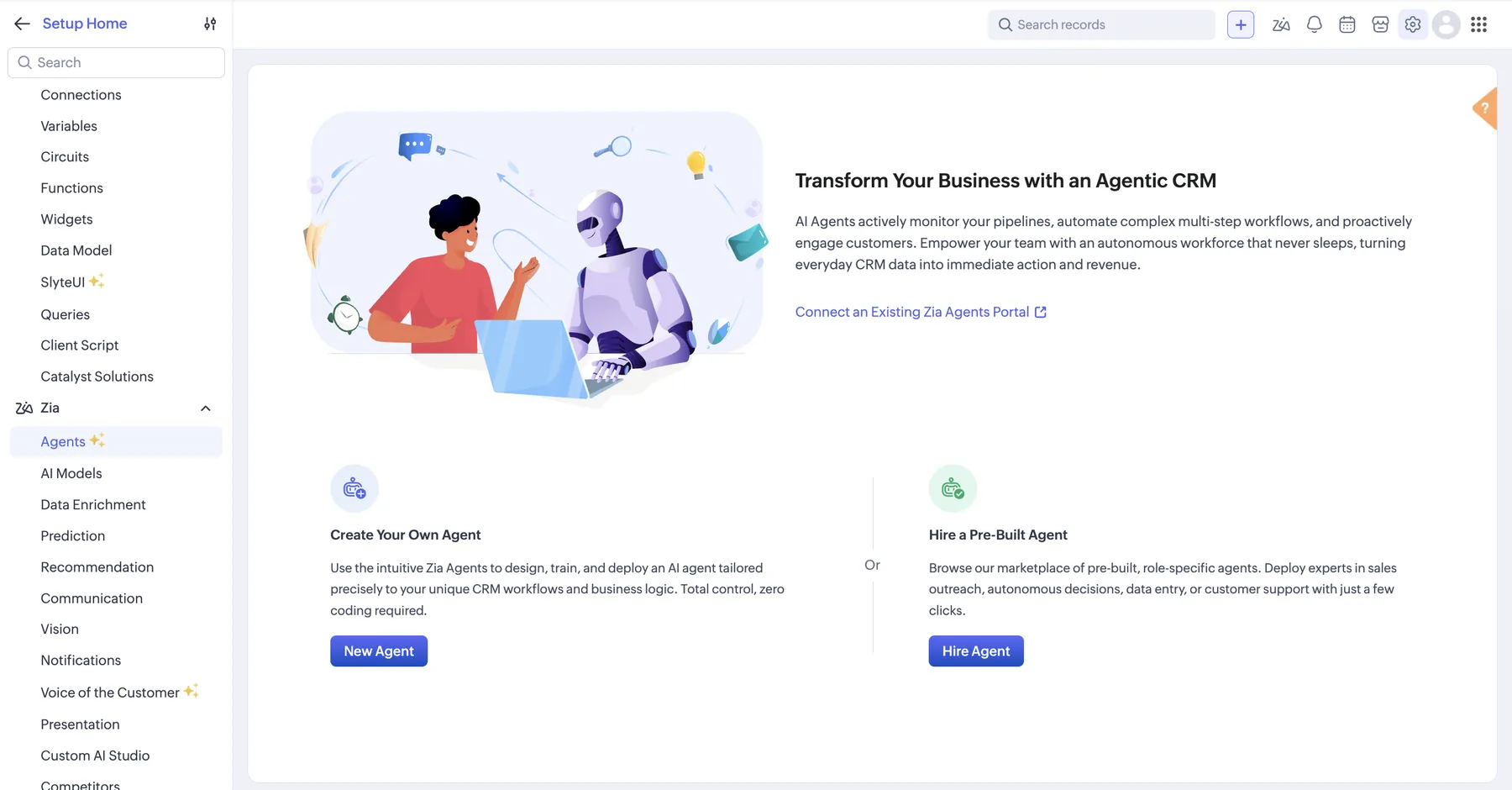
In current Zoho CRM accounts the agent builder sits under Setup > Zia > Agents. Some older Zoho help pages still point to Setup > General > Agents, so check there if you don't see it under Zia.
- In Zoho CRM, open Setup, expand Zia in the left menu and click Agents.
- Pick how you want to start: New Agent to build your own, Hire Agent to choose a pre-built one from Zoho's marketplace, or Connect an Existing Zia Agents Portal if your company already has one.
- For your own agent, give it instructions, a knowledge base and tools. For a pre-built one, pick it from the store and review what it is allowed to do.
- Test it on sample CRM records before deploying.
- Deploy it, either using a Connection (it acts as you) or as a Digital Employee (it gets its own role, profile and email address, and its actions are logged under that identity).
- Back in Agents, hover over the draft agent, click Setup Now, pick the module and the records it should run on, map its inputs to CRM fields, and optionally add a custom button.
- Click Activate, then choose which user profiles can see it.
Deploy as a Digital Employee whenever the agent writes to records. When something goes wrong, the audit trail shows the agent did it, not the admin who set it up.
How do you connect Zoho CRM to n8n?
The connection is quick once you know the two traps: picking the right data centre and getting events out of Zoho.
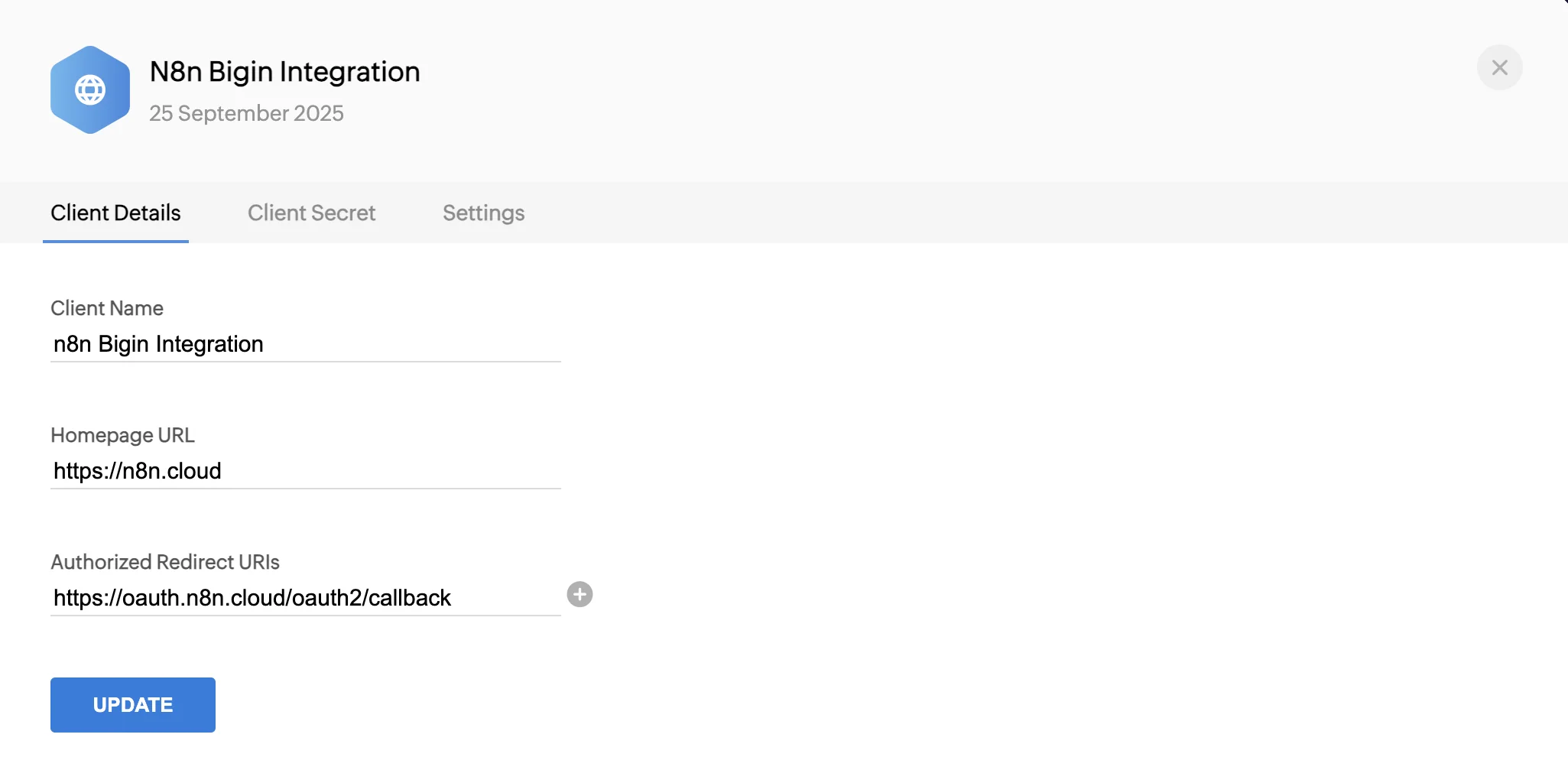
- In the Zoho API Console (api-console.zoho.com), create a client of type Server-based Applications.
- In n8n, create a Zoho OAuth2 credential and copy its callback URL into the Zoho client's Authorized Redirect URIs.
- Paste the Client ID and Client Secret into n8n.
- Pick the Access Token URL that matches your Zoho data centre (US, EU, AU, IN and others). Check your CRM's address bar:
crm.zoho.comis US,crm.zoho.euis EU,crm.zoho.com.auis Australia. - Connect, and test with a Get all leads step.
- Because n8n has no Zoho CRM trigger, send events the other way: in Zoho, create a workflow rule with a Webhook action pointing at an n8n Webhook node.
- For anything the Zoho CRM node doesn't cover, such as tags or related lists, use n8n's HTTP Request node with the same Zoho credential.
How do you connect Claude to Zoho CRM with MCP?
Setting up Claude with Zoho CRM takes a few minutes if the connection works first time. Zoho's documentation covers Claude Desktop.
- Sign in to Zoho MCP, create a server for Zoho CRM, choose the tools it may use, and copy its server URL.
- In Claude Desktop, open Customize > Connectors, click Add, then Add Custom Connector.
- Name it, paste the server URL into Remote MCP Server URL, and click Add.
- Select the new connector and click Connect to sign in to your Zoho CRM organisation.
- Start with read-only questions. Turn on write tools only after you trust the results.
If you get "Invalid server url" or every tool fails with "Connection Error", the cause is usually the data centre: your Zoho account lives in one region and the connection is pointing at another. Users in that thread reported the directory connector pointing at the wrong region; creating the server yourself in Zoho MCP, inside your own Zoho account, is the first thing to try, because it ties the connection to your account's own data centre.
For n8n's own MCP features, see n8n's MCP server.
What breaks in real builds?
Five problems come up again and again, in my builds and in Zoho's own forums. None of them are in the setup guides.
Wrong data centre
Zoho runs separate data centres for the US, EU, India, Australia and other regions, and every login, token and API call has to point at yours. A wrong choice shows up as "Invalid server url", "invalid_client" or a connection that succeeds but returns nothing. Check your CRM's address bar before you configure anything.
Expired or revoked tokens
OAuth connections in n8n and custom code stop working when the refresh token is revoked, the client is deleted, or the user who authorised it leaves. Authorise integrations with a dedicated integration user, not a staff member's login.
Agent runs timing out
Zia Agents users reported runs failing after 15 minutes with AGENT_EXECUTION_TIMED_OUT (Zoho community). Keep each agent run to one job on one record; long research tasks belong in n8n, where you control timeouts and retries. Zoho may have changed the limit since those reports, so test a long run before you rely on it.
WhatsApp number already in use
If a WhatsApp Business number is already connected to another Zoho service or provider, connecting it to an agent fails (reported as CONFIGURED_IN_CHANNEL). Decide early which tool owns the WhatsApp number. More on the setup in WhatsApp Business API automation.
API and Deluge limits
Loops that update records one at a time burn API credits and Deluge statement limits fast. Batch updates up to 100 records per call, and use webhooks instead of polling Zoho every few minutes.
One more, specific to Zoho One customers: a Zoho One user reported that Zia Agents made him create a separate account instead of using his Zoho One login. If that still applies to your account, plan for an extra admin login.
Where does your CRM data go?
With Zia Agents on Zoho's own models, your data stays with Zoho. With your own OpenAI, Gemini or Claude key, the prompt and the CRM fields you pass to the agent go to that provider under its terms. With Zoho MCP, the assistant you connect sees whatever its tools return. With n8n on your own server, you decide exactly what leaves.
Three rules I use on every build:
- Send the agent only the fields it needs. A lead qualification agent needs the enquiry text and the company, not the full contact history.
- For EU and UK clients, keep the Zoho data centre, the model provider's region and the n8n server in the region your privacy policy names.
- Any agent that sends a message to a customer or changes a deal value gets a human approval step until it has run cleanly for a few weeks. See human-in-the-loop AI agents.
What this looks like in a real build
For an international freight forwarder, the CRM runs seven connected modules (Inquiries, Contacts, Accounts, Deals, Quotes, Jobs and Cost Sheets), moved along by client scripts and Deluge. n8n brings leads in from B2B marketplaces, website forms, Meta ads and WhatsApp. On WhatsApp, an AI assistant qualifies freight enquiries in three languages, asks only for the details still missing, stores the conversation in PostgreSQL, and alerts sales when someone asks for a quote.
That build uses two of the three options in this guide: Zoho's own automation for everything rule-based inside the CRM, and n8n for the AI conversation and the multi-source intake. Read the freight forwarder CRM case study and the WhatsApp sales bot case study.
Three questions to answer before you decide
- What exact task should the agent do? "Qualify inbound leads from the website form" is buildable. "Use AI in sales" is not.
- Does the task touch anything outside Zoho? No: start with Zia Agents. Yes: n8n.
- Who talks to the agent? Your team asking questions: Zoho MCP or Zia. Customers on WhatsApp, chat or the phone: n8n, with Zoho as the record.
Key takeaways
- Choose by where the work happens: inside Zoho (Zia Agents), through an assistant (Zoho MCP), or across systems (n8n).
- Zia Agents' platform is free; you pay for model usage beyond 30 million free tokens a month on Zoho's standard models.
- Most "AI in Zoho" jobs are rules. Build those with workflow rules and Blueprint, and save agents for steps that need judgement.
- The data centre causes more failed connections than anything else. Check it first.
- Give any agent that writes to records or messages customers its own identity and a human approval step at the start.
Common questions
Is Zia Agents included in Zoho One?
Zia Agents' platform is free, but a Zoho One user reported needing a separate account to use it. Check this in your own account before you plan the rollout.
Can Zia agents run on a schedule?
As of November 2026, Zoho documents button, record-condition and chat triggers, not schedules. For scheduled jobs, trigger the work from n8n.
Can I use ChatGPT or Claude instead of Zoho's models?
Yes. Zia Agents accepts your own OpenAI, Gemini or Claude key, billed by that provider. Zoho MCP works with Claude and other assistants directly.
Will my CRM data be sent to OpenAI?
Only if you choose an OpenAI model. On Zoho's own models it stays with Zoho. See Where does your CRM data go?.
Do I need Enterprise edition for AI agents?
Zoho lists Zia Agents for paid CRM plans, and n8n works with any edition that has API access.
Does n8n replace Zoho CRM?
No. Zoho stays the system of record. n8n moves data and runs AI steps around it.
If you'd rather have this built and running in your own Zoho CRM, here is how I work with Zoho teams.
Want AI agents working inside your Zoho CRM?
I build Zia agents, n8n automations and WhatsApp follow-up on top of Zoho CRM for service businesses in the US, UK, Australia and the UAE. Tell me the job; I'll tell you which of the three fits and what it costs.
Related resources
Go deeper
Related posts, the service page and real builds connected to this guide.
Further reading
Guide
Read: Zoho Zia Agents vs n8n: Where to Build AI Agents in 2026
Zoho Zia Agents vs n8n in 2026: a consultant's framework for which AI agents to build inside Zoho, which to build outside, and what each costs.
Guide
Read: Zoho CRM Zia AI Features in 2026: What's Worth Turning On
Every Zia AI feature in Zoho CRM sorted into enable now, pilot first, or skip — with links to the official docs and what real SMB rollouts actually show.
Guide
Read: n8n Error Handling in 2026: Stop Silent Workflow Failures
n8n error handling in 2026: how to layer node retries, error workflows, Stop and Error checks, and monitoring so workflows never fail silently.
Guide
Read: Human-in-the-Loop AI Agents: The 2026 Approval Framework
Human-in-the-loop AI agents don't need approval on every action. Here's the four-tier risk framework that keeps AI agent oversight tight in 2026.
Proof pages
Case study
See case study: Custom Zoho CRM with Auto-Pipeline for a Freight Forwarder
A freight CRM that carries an enquiry through contacts, accounts, deals, quotes, jobs, cost sheets, and invoicing — with client scripts and Deluge automation removing the re-typing between every stage.
Case study
See case study: Multilingual WhatsApp Sales Bot for an International Freight Forwarder
A WhatsApp AI sales assistant that qualifies freight enquiries in three languages, remembers every conversation, and alerts the sales team the moment a quote is requested.