n8n
How to Connect Zoho CRM to n8n: Setup, Webhooks and Duplicates
Connect Zoho CRM to n8n the reliable way: the right data centre, OAuth setup, webhooks for new records, duplicate checks, and the updates that wipe data.
4 Nov 2026 · 10 min read · Abhijeet Singh
On this page 11 sections
Connecting Zoho CRM to n8n takes four pieces: a Zoho API client, an n8n credential pointed at your Zoho data centre, a Zoho workflow rule that sends a webhook when a record changes, and a duplicate check before every write. The setup itself is quick. What costs time is the part nobody documents: the wrong data centre, Zoho's empty replies, and updates that overwrite good data with blanks.
This post is part of the guide to AI agents for Zoho CRM, which covers when n8n is the right tool in the first place. Here we stay with the how-to. Everything below comes from n8n workflows I run against live Zoho accounts, checked against Zoho's and n8n's documentation as of November 2026.
Step 1: Find your Zoho data centre before anything else
Zoho runs separate data centres, and your account lives in exactly one of them. A credential built for zoho.com will not work for an account on zoho.eu, and the errors never say "wrong region". I once spent hours rereading documentation and recreating credentials for a client, and the whole problem was .com versus .eu.
Check the address bar when you are logged in to the CRM:
crm.zoho.comis the US data centre: accounts ataccounts.zoho.com, API atwww.zohoapis.comcrm.zoho.euis the EU:accounts.zoho.eu, API atwww.zohoapis.eucrm.zoho.inis India:accounts.zoho.in, API atwww.zohoapis.incrm.zoho.com.auis Australia:accounts.zoho.com.au, API atwww.zohoapis.com.au
Zoho also runs data centres in Japan, Canada (zohocloud.ca) and China. Write yours down. You need it three times: in the API client, in the n8n credential, and in every API address you call.
Step 2: Create the API client in Zoho
- Sign in to the Zoho API Console with the account that owns the CRM, on your data centre's domain.
- Add a client of type Server-based Applications.
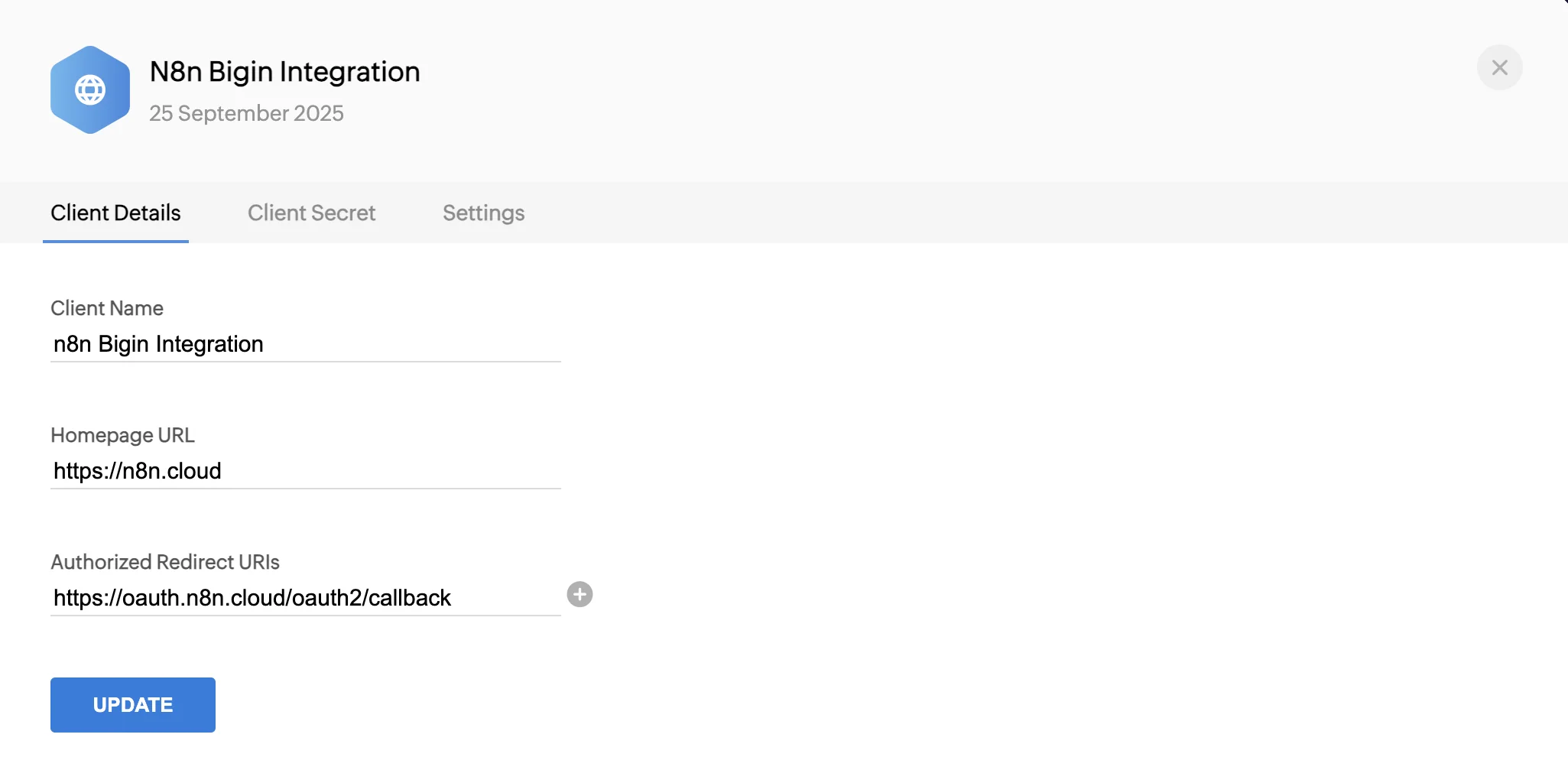
- Give it a name, use your website as the homepage URL, and paste n8n's OAuth callback URL into Authorized Redirect URIs. You copy that URL from the n8n credential in step 3, so keep both tabs open.
- Copy the Client ID and Client Secret.
On n8n Cloud you can skip this: the Zoho credential offers "Connect my account". On a self-hosted n8n you need your own client.
Step 3: Create the n8n credential and test it
- In n8n, create a Zoho OAuth2 API credential.
- Copy its OAuth Callback URL into the Zoho client from step 2.
- Paste the Client ID and Client Secret.
- Pick the Access Token URL for your data centre. n8n offers US, EU, IN, AU and CN. n8n's docs describe CN as Canada, while Zoho uses CN for China and
zohocloud.cafor Canada, so if you are on either, check the address it fills in. - Connect, approve Zoho's consent screen, then run a Zoho CRM node with Lead › Get Many. If leads come back, the connection works.
Why I use the HTTP Request node for most Zoho calls
n8n's Zoho CRM node covers ten modules (leads, contacts, accounts, deals, products, quotes, invoices, sales orders, purchase orders and vendors) with create, upsert, get, get many, update and delete. That is enough for a first workflow. In real builds I use it for simple reads and do most of the work with the HTTP Request node, picking the same Zoho credential under Predefined Credential Type.
The node can't search by email or phone, add tags, reach custom modules or run a COQL query (Zoho's SQL-like query language). The HTTP node can do all of that with the same login.
One rule for the HTTP node: the address must use your data centre's API domain and the current API version, for example https://www.zohoapis.eu/crm/v8/Leads/upsert for an EU account. A US address against an EU account fails just like the wrong token URL does.
How do you trigger n8n when something changes in Zoho CRM?
n8n has no Zoho CRM trigger node, so you turn it around and let Zoho tell n8n.
- In n8n, add a Webhook node set to POST and copy its Production URL.
- In Zoho, go to Setup › Automation › Actions › Webhooks and create a webhook that calls that URL.
- Go to Setup › Automation › Workflow Rules, create a rule (for example: Contacts, on create) and attach the webhook as an instant action.
I put only the record ID in the webhook. The first step in n8n fetches the full record with a GET call. The payload stays small, n8n always works with the record as it is right now, and adding a field later does not mean editing the webhook in Zoho.
Four details cause most of the failures I see:
- Test URL or Production URL. n8n's Test URL only listens while you click "Listen for test event". Zoho needs the Production URL, and the workflow must be published. I have found integrations still pointing at a test address after go-live.
- Answer fast. Zoho gives up if it gets no reply within 10 seconds. Let the Webhook node respond straight away and do the slow work after it. If a call fails, Zoho's help page says it tries once more about 15 minutes later and then stops, so give the workflow an error workflow (see n8n error handling).
- Protect the address. Add a header with a secret value to the Zoho webhook and turn on Header Auth in the n8n Webhook node, so only Zoho can start the workflow.
- Use a fresh Webhook node in every workflow. I never copy one from another workflow, so two workflows never end up listening on the same path.
Webhooks in workflow rules need a paid edition. Zoho's help page lists daily webhook limits from the Professional edition up, starting at 50,000 calls a day or 100 per user, whichever is lower.
How do you stop n8n from creating duplicate records?
There are two ways, depending on how clean the incoming data is.
Upsert, when one field identifies a person. A POST to /crm/v8/Leads/upsert inserts or updates in one call. Zoho checks Email by default for leads and contacts, and duplicate_check_fields lets you choose other unique fields. The reply tells you what happened: action is insert or update, and duplicate_field names the field that matched. One call takes up to 100 records.
Search first, when the same person turns up with different details. Website and ad forms are messy: someone uses a work email one week and only a phone number the next. For a client's lead forms the rule is to search by email, then by phone, update the record if one is found, and create one only if nothing is. Search Leads and Contacts. One client workflow searched Leads only, so anyone who had already been converted to a Contact got a brand new duplicate lead.
The trap in that search: when nothing matches, Zoho does not send back an empty list. It sends HTTP 204 with no body at all. A workflow that expects a record then errors or skips the create step. Handle the empty case on purpose: check whether an ID came back before you branch, and if the node returns no items at all, turn on Always Output Data in its settings.
The updates that quietly wipe good data
The worst Zoho bug I have fixed threw no error at all. A client's website form had two steps. Step 1 created the lead with the name and contact details. Step 2 sent the rest, and its workflow updated the same lead, including the name fields it didn't have, as blanks. Every step 2 submission wiped what step 1 had saved, and it only showed up when nameless records started piling up. Fixing it meant rebuilding the damaged records from the original form submissions.
Three rules came out of it:
- Only send fields that have a value. Build the update from the fields you actually received and leave everything else out. A field you leave out stays as it is. A field you send empty can overwrite what was there.
- Wait before looking up a record you just created. Zoho's own search documentation warns that searching right after a create or edit can come back empty because of an indexing delay. Step 2 often arrived seconds after step 1, so the lookup missed. A one-minute Wait node before the search fixed it. If you can't wait, Zoho suggests its COQL query API instead.
- Multi-select fields are replaced, not added to. An update replaces a multi-select picklist's values by default. To add a value and keep the old ones, use
$append_valuesin the request.
Tags and the other things the node can't do
Tags go through their own endpoint: a POST to /crm/v8/Leads/{record_id}/actions/add_tags with a tags list. Existing tags stay unless you set over_write to true. The same pattern (HTTP node, Zoho credential, v8 address on your data centre's domain) covers related lists, custom modules and COQL queries.
Tokens, API credits and the "who did this?" problem
- Tokens. Zoho access tokens last one hour and n8n refreshes them for you. Refresh tokens don't expire until revoked, but Zoho keeps at most 20 per user: creating the 21st silently invalidates the oldest. If you reconnect the credential over and over, or several tools connect as the same user, an older connection can stop working with no warning.
- API credits. Every call spends credits from a rolling 24-hour allowance. Standard gets 50,000 plus 250 per user licence (capped at 100,000), Professional 50,000 plus 500 per user. A search or a single GET costs one credit, while inserts, updates and upserts cost one credit per 10 records, so batch writes up to 100 at a time.
- Parallel calls. Standard allows 10 calls at once, Professional 15. An n8n loop that fires dozens of requests together can hit Zoho's TOO_MANY_REQUESTS error, so batch or slow those loops.
- The name on every record. Records n8n creates show the Zoho user whose login the credential uses. On one client account, everything the automation created appeared under a real person's name, and nobody new to the account would guess that meant "n8n did it". Use a dedicated integration user if you can spare a licence, or at least tell the team which name means the automation.
A checklist before you go live
- The data centre matches in the Zoho client, the n8n credential and every API address.
- The Zoho webhook calls the Production URL, and the workflow is published.
- The webhook sends a secret header, and n8n checks it.
- The webhook carries only the record ID, and n8n's first step fetches the record.
- The duplicate check covers Leads and Contacts, and the empty "nothing found" case is tested.
- Updates send only fields that have values, and multi-select fields append where they should.
- There is a wait (or a COQL query) before any lookup of a record created seconds earlier.
- An error workflow is attached.
- You have tested a new person, a returning person and someone who is already a Contact.
When to bring in help
If n8n only needs to drop form leads into Zoho, the steps above are enough. When it starts writing to several modules, updating deals or feeding AI agents, every rule here matters at once. Before adding an agent, read where AI agents fit next to n8n. If you would rather have someone build and look after it, this is the work I do on Zoho CRM projects.
Related resources
Keep building the automation map
Move from the guide into the services and proof pages connected to this topic.
Related services
Service
Explore n8n Workflow Development
Custom n8n workflow automation for lead capture, CRM sync, AI enrichment, approvals, and notifications — built to keep running when nobody is watching.
Service
Explore Zoho CRM Consulting
Zoho CRM setup, custom modules, client scripts, Deluge functions, workflow rules, and cross-module automation.
Service
Explore Custom CRM Implementation
Custom CRM architecture for sales pipelines, operations handoff, service workflows, invoicing, and reporting dashboards.
Further reading
Article
Read: n8n Error Handling in 2026: Stop Silent Workflow Failures
n8n error handling in 2026: how to layer node retries, error workflows, Stop and Error checks, and monitoring so workflows never fail silently.
Article
Read: Zoho CRM API Limits in 2026: How to Budget Your Credits
Zoho CRM API limits run on credits, not call counts. See the per-edition credit maths, the operations that cost most, and how to design integrations that fit.
Article
Read: Zoho Flow AI Automation in 2026: A Practical Guide
Zoho Flow AI automation now includes agentic actions and Zia Utilities. Here's what shipped, what it's good for, and how to adopt it safely.
Proof pages
Case study
See case study: Complete Zoho Stack for a B2B Packaging Manufacturer
One Zoho operating system for a B2B packaging manufacturer — sales, service, inventory, accounting, ticketing, and analytics — replacing the legacy Excel and Salesforce files the business used to run on.
Case study
See case study: Custom Zoho CRM with Auto-Pipeline for a Freight Forwarder
A freight CRM that carries an enquiry through contacts, accounts, deals, quotes, jobs, cost sheets, and invoicing — with client scripts and Deluge automation removing the re-typing between every stage.